
This is a working title but for now it explains pretty well what I am trying to do.
I am a keyboard junkie. I always have my right hand on my mouse and my left hand on my keyboard, usually ready for a CTRL/SHIFT/ALT + [KEY] combo to quickly knock out a task. I plan to share some quick tips that may help you be more productive when using the computer.
INFORMATIONAL
My name is Jáśøn Lâmb, written with Latin Letters with Diacritical Marks. There are many ways to write this. Jásön Låmb, Jãśõñ Lãmb, Jáśøn Lâmɓ.
THE SHORTCUTS
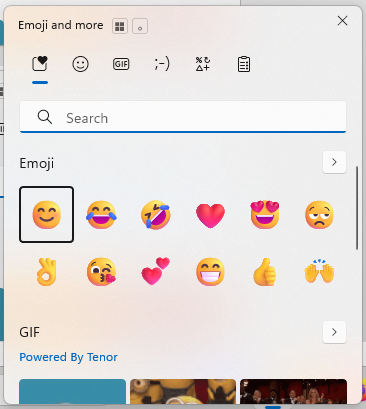
WIN + . (peroid) ~ to launch the ‘Emoji and more’ popup – this will pop up a window in the lower right corner of your screen with several tabs and sections to add Emoji’s, GIFs, Kaomoji, and Symbols. Don’t ask me how to pronounce Kaomoji, maybe ‘Kay-Oh-Mow-Gee’? Do you pronounce GIF like hard G as in ‘Golf’ or soft G like ‘Jog’? I know the ‘proper’ way but I still prefer the ‘wrong’ way. I was raised PBnJ so it’s a Jiff for me.


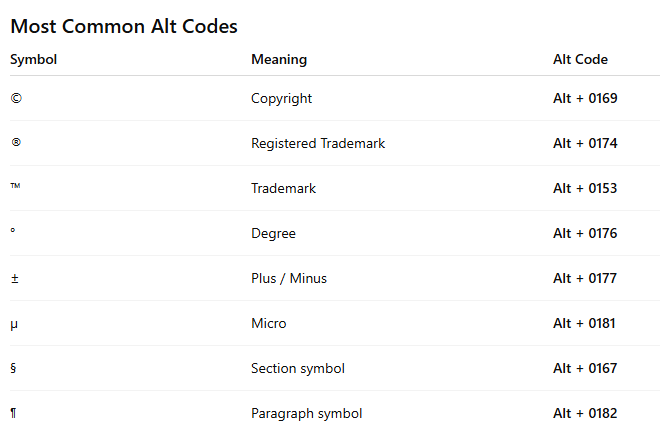
Historically DOS did not use a leading 0 (zero) for its characters. This chart below shows ALT + 169 as © but if you try that in Notepad, Notepad++, or Word you will get ⌐ instead of ©. The chart is not wrong but it is referencing a different character table. Older Window use Window-1252 but the old DOS was based on CP437. Modern Windows use the full Unicode table which includes over 149,000 characters compare to just 256 in the Windows-1252 table.

https://jasr.me/altcodes to see the full PDF
Let me know what program I can cover next and I am sure I have keyboard shortcuts for it.
This is also available via LinkedIn.